PinJob Browser Extension — One-Click Job Application Tool
A browser extension that revolutionizes job applications login with PinJob, select your CV, get AI-powered match scores for any job listing, and apply with one click. Auto-fills and submits applications across LinkedIn, Jobzyn, Emploi Maroc, and more. Built with WXT, Vue 3, and TypeScript.
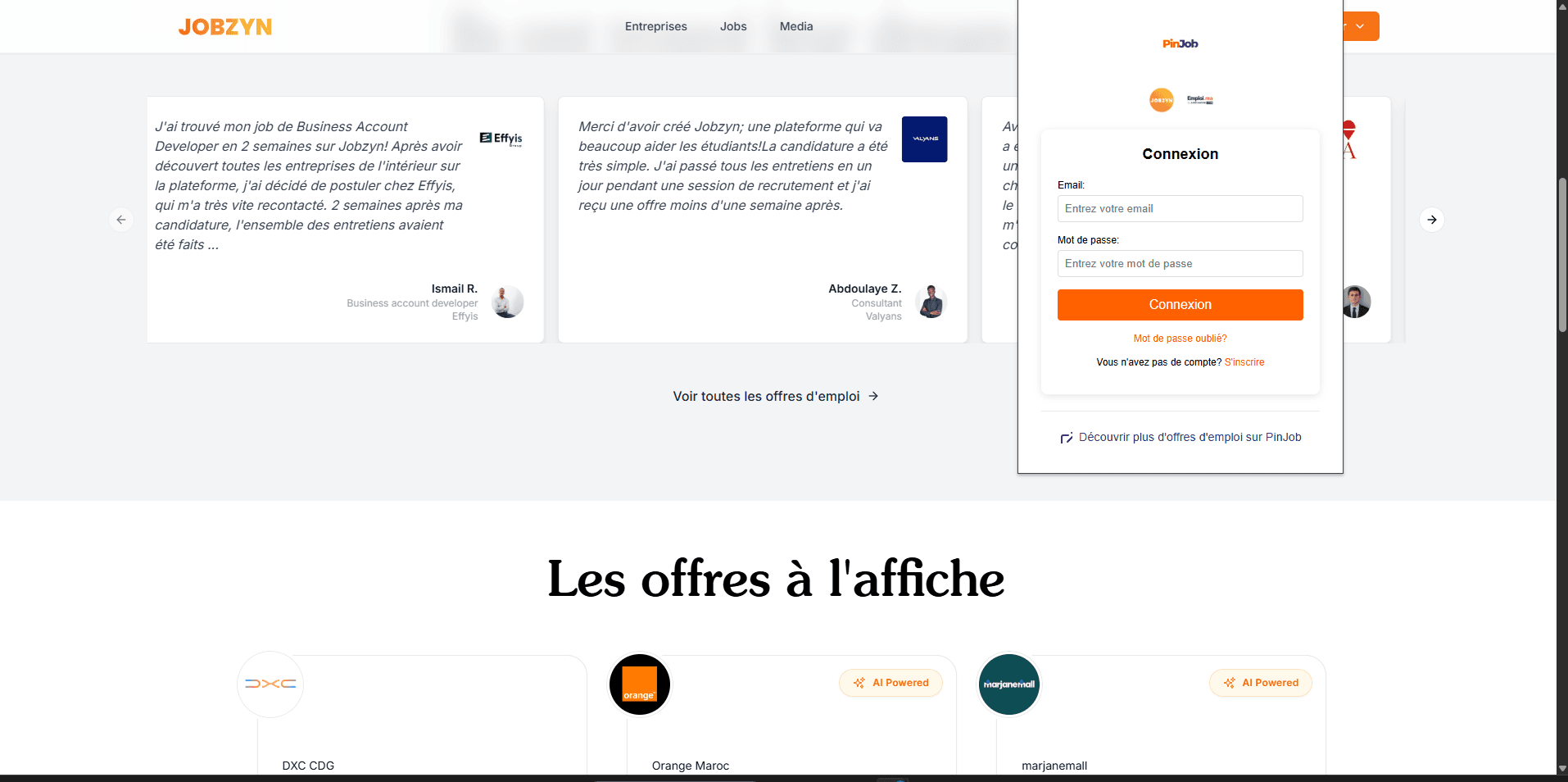
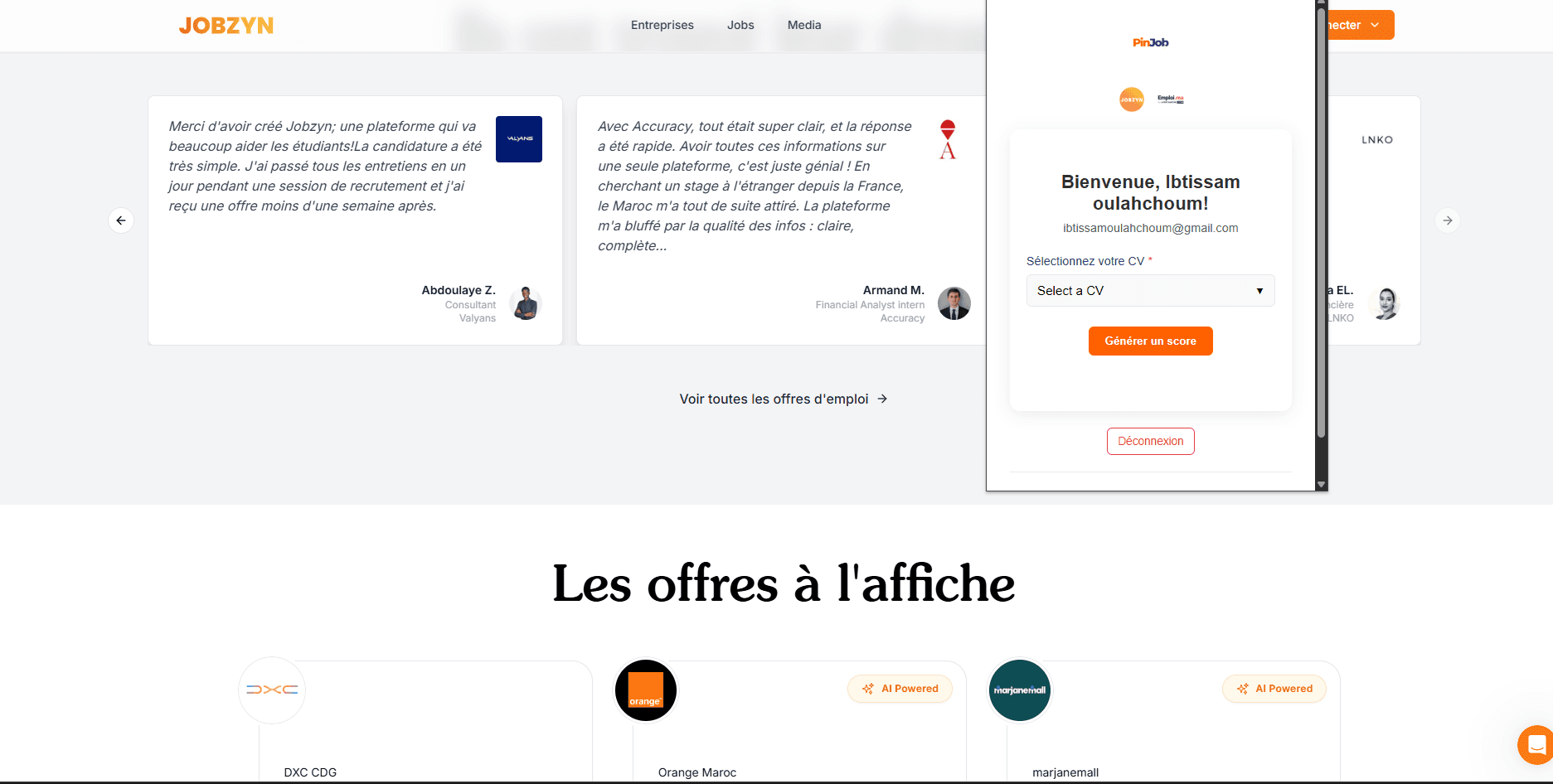
I developed a browser extension that bridges the PinJob platform with job sites, enabling users to apply to positions in a single click. This was my first experience building a browser extension, and it came with unique challenges that pushed my skills in new directions. The workflow is seamless: users log into their PinJob account through the extension, select one of their saved CVs, and browse job listings as usual. When viewing a job post, the extension automatically extracts the job description and sends it to the PinJob backend. The AI analyzes the match between the user's CV and the job requirements, returning a compatibility score. If the user decides to apply, one click triggers the magic — the extension auto-fills the entire application form with their information and submits it automatically. No more repetitive typing of the same details across dozens of applications. The extension works across multiple job platforms including LinkedIn, Jobzyn, and Emploi Maroc. Each site has different DOM structures and form layouts, so I built adaptive scrapers and form handlers for each platform. The biggest technical challenge was extracting job data from LinkedIn — their dynamic rendering and anti-scraping measures required creative solutions. Building reliable form detection and auto-fill logic across different sites taught me to write flexible, defensive code that handles edge cases gracefully. Built with WXT (modern Web Extension framework), Vue 3 for the popup UI, and TypeScript for type-safe, maintainable code.
My Tasks
- Built the entire browser extension solo — my first extension project
- Developed authentication flow connecting to PinJob user accounts
- Created CV selection interface within the extension popup
- Built job description extraction scrapers for multiple platforms (LinkedIn, Jobzyn, Emploi Maroc)
- Integrated with PinJob backend API for AI-powered CV-job matching scores
- Developed one-click application system with automatic form detection
- Built auto-fill logic that maps user data to various form field types
- Implemented auto-submit functionality for seamless applications
- Solved complex scraping challenges, especially LinkedIn's dynamic content
- Created adaptive handlers for different job site DOM structures
- Built the popup UI with Vue 3 for a clean, intuitive user experience
- Used TypeScript throughout for type safety and code quality
- Worked with WXT framework for modern extension development patterns
What I Learned
- Technical Growth: This was my introduction to browser extension development, and it opened up a whole new domain. I learned the extension architecture — background scripts, content scripts, popup UI, and how they communicate. Understanding the separation between page context and extension context was crucial for building reliable scrapers.
- Extracting data from LinkedIn was the toughest challenge. Their React-based rendering, lazy loading, and anti-bot measures meant I couldn't rely on simple DOM queries. I learned to wait for dynamic content, handle mutation observers, and write resilient selectors that survive minor UI changes.
- Building auto-fill logic for multiple sites taught me that forms are never standard. Some use input elements, others use contenteditable divs, some have custom dropdown components. I learned to detect field types heuristically and simulate user interactions (clicks, keyboard events) to trigger validation.
- TypeScript proved invaluable for this project — with so many moving parts (scraping, API calls, form manipulation), type safety caught countless bugs before they reached testing.
- Soft Skills & Professional Growth: Starting a completely new technology domain (extensions) reminded me that learning never stops. The skills I had in web development transferred partially, but extension development has its own rules, limitations, and best practices.
- This project taught me to embrace constraints. Extensions run in a sandboxed environment with security restrictions — I couldn't just do things the "normal" way. Working within those boundaries forced creative problem-solving.
- Building something that saves users hours of repetitive form-filling felt impactful. Every feature decision was guided by one question: "Does this reduce friction for job seekers?" That user-focused mindset made the technical challenges feel worthwhile.
Project Info
- Type
- Featured Project
- Technologies
- 8
- Tasks
- 13
- Learnings
- 7
Screenshots (2)
Related Projects
Interested in working together?
I'm available for freelance projects and full-time opportunities.
Hire Me